
NFC Table Lamps for Restaurants: Tap for Menus, Flip for Service
BUYER GUIDES · CONNECTED HOSPITALITY
A table lamp can do more than light the table. With NFC, it can become a simple starting point for a digital menu, a drinks list or useful guest information—while a separate flip-to-red function gives diners a visible way to request service.

Two gestures. Two different purposes.
Our earlier guide to flip waiter-call lamps in noisy bars explored a familiar problem: a guest needs attention, but their voice gets lost in the room. Turning the red-ring end upward creates a visible red service signal; the white-ring end upward is the ambient-light position.
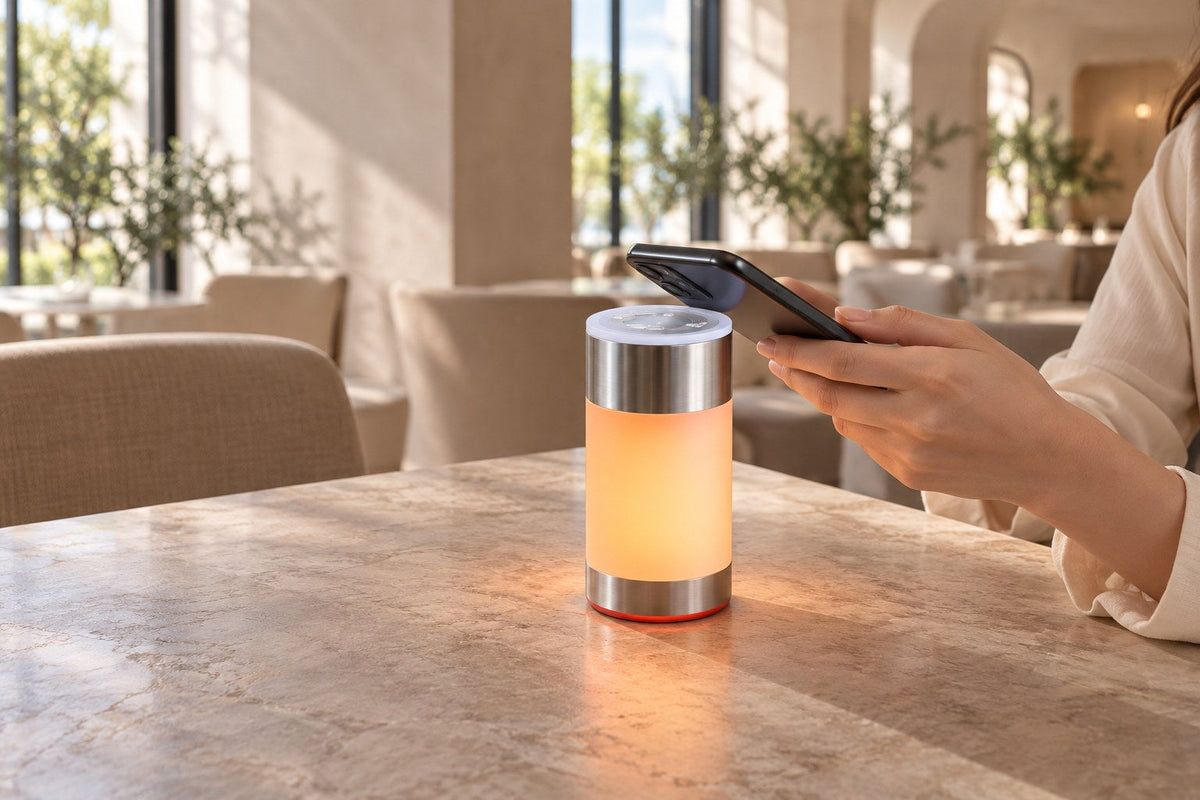
NFC adds a different interaction. Instead of asking a guest to find a website, an NFC-enabled version of the lamp can provide a link at the table. The guest brings a compatible smartphone close to the NFC area and follows the phone’s prompt to open the destination.
Information on a phone
Open a configured menu or information link. The webpage determines what the guest can do next.
A signal staff can see
Turn the red-ring end upward to request attention. Staff need a clear view of the table and an agreed response routine.
Opening a menu is not the same as placing an order. If a venue’s linked page supports ordering, guests can continue there. Order routing, table identification and payment depend on that system; they are not supplied by an NFC link alone.
Watch the NFC demonstration
The video below shows our NFC-enabled flip lamp being configured with a web link, followed by a phone reading the tag and opening the linked page. It demonstrates the link-sharing workflow rather than a restaurant checkout system.
PRODUCT DEMONSTRATION
From a link to a guest experience
- Prepare the destination. Choose the page guests should open.
- Configure the tag. The demonstration uses a phone-based NFC writing tool.
- Read and open. Bring a compatible phone to the NFC area and follow its on-screen prompt.
The setup tool shown is used to configure the tag. Guest reading behavior varies by phone and settings.
Four ways to use NFC at the table
The following are illustrative operating scenarios, not documented customer installations or measured results.
01 / A restaurant menu, ready when guests sit down
A couple arrives for dinner and wants to browse before speaking with a server. The lamp links to the restaurant’s mobile menu, where they can explore dishes at their own pace. When they are ready to ask a question or place an order with staff, they flip the lamp to its red service position.
For the venue, the practical design decision is the landing page: readable text, clear sections and fast access to the menu. Where ingredient or allergen information is offered, keep it current and retain a direct route to staff for questions.
02 / A drinks list in a busy bar
At a lively lounge, a guest wants to explore the drinks selection without calling across the room. A tap opens the bar’s drinks page. After choosing, the guest uses the separate flip signal to request attention.
The two actions work well as a simple service language: use the phone to browse and the light to ask for help. Keep the linked page focused on the drinks list rather than sending guests through a general website homepage.

03 / Helpful information in a hotel lounge
A hotel guest settles into the lounge between appointments. The lamp can link to a concise guest page with lounge opening hours, dining options or a reservation link. A multilingual destination can let visitors choose their preferred language without adding more printed material to the table.
Keep information specific to that space. A lounge guest should not need to search through the entire hotel website to find the lounge menu.
04 / A private dinner or hosted event
For a private dining event, a dedicated page could introduce the evening’s menu, schedule or host’s welcome message. Guests access the information from the table, while staff remain available for personal service.
The same idea can extend to a hosted dinner at home: a shared menu or evening programme can live behind a link. In either setting, the destination should be relevant, easy to read and accessible without unnecessary sign-in steps.
Design the destination as carefully as the table
The lamp provides the physical touchpoint. The linked page completes the experience. A well-designed NFC menu should answer the guest’s immediate question, not create another task.
- Choose one clear first destination. Lead with the menu, drinks list or guest information the table needs.
- Use a mobile-friendly page. Readable type and straightforward navigation matter more than decorative effects.
- Keep the address stable. If the same web address remains in use, you can update its content without changing the link stored on the tag.
- Offer another way to browse. A printed menu, QR option or help from staff keeps the experience accessible to guests who do not use NFC.
- Test the complete journey. Check the phone prompt, page loading and any ordering steps before introducing it during service.
Plan the NFC configuration before rollout
Start with a small table trial. Test the exact lamp configuration with the phones your team uses, check the reading position and confirm the destination opens as expected. NFC support and reading behavior vary with the device and its settings. Online content also needs an internet connection.
If your ordering platform assigns orders to individual tables, include that requirement in the project discussion. A general menu link does not automatically identify a table. Decide who maintains the web content and tag configuration, and include a link check in your routine table setup.
Frequently asked questions
What is an NFC table lamp?
It is a table lamp equipped with an NFC tag that a compatible smartphone can read at close range. In the demonstrated configuration, the tag provides a web link that the phone can open.
Can it open our restaurant menu?
Yes, a configured link can direct guests to your restaurant’s online menu. The destination should be a mobile-friendly page that your team maintains.
Does tapping the lamp send an order to the kitchen?
No, reading the NFC link alone does not send an order. That requires a linked ordering system with the appropriate ordering and table-management functions.
Do guests need the NFC writing app shown in the video?
The writing tool shown is for configuring the tag. Reading a web-link tag depends on the guest’s phone and settings; supported phones may display a link prompt without that setup app. Test your target devices and provide an alternative menu option.
Does NFC replace the flip-to-red service signal?
No. NFC opens digital content, while flipping the lamp creates a visible service request. The red light still depends on staff seeing the table and responding.
Can we discuss a branded hospitality project?
Yes. Jianbian Lighting Technology (zhongshan) Co., Ltd. supports OEM and ODM projects, including logo, packaging and surface-finish requirements. Specify the NFC-enabled configuration, your intended link destination and your service workflow when making an enquiry.
JIANBIAN LIGHTING
Make the next step clear at every table.
Tell us about your restaurant, bar or hotel, the number of tables and what guests should see when they tap. We can discuss the lamp configuration alongside your charging and customization requirements.
Discuss your NFC lamp project ↗Scene images are AI-created application illustrations. The embedded video is a product demonstration supplied by Jianbian Lighting. Phone compatibility guidance: Apple background NFC tag reading.
Bring your table.
We'll help with the light.
Share your preferred models, estimated quantity and destination market with Lewis.